If your team translates content into more than a couple of languages, you have probably felt the friction. Files travel by email. Someone asks whether the latest version went to the translator. A term gets translated three different ways. Nobody can say exactly what a project cost until the invoices arrive.
A translation management system, usually shortened to TMS, exists to fix that. But it is not the right answer for everyone. This guide explains what a TMS is, what it actually does, the signs you have outgrown your current setup, and the cases where you can happily skip one.
What is a translation management system?
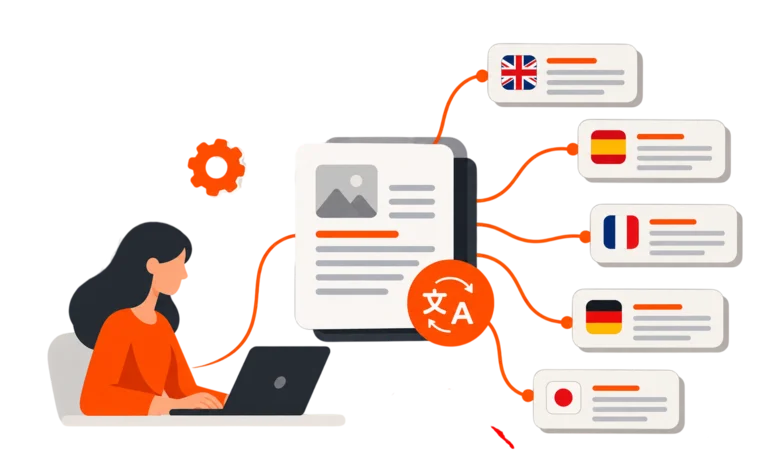
A translation management system is software that manages the whole translation and localization process in one place. It takes content in, routes it to the right people and tools, keeps track of every step, and delivers the finished translations back to where they are needed.
Think of it as the operating system for multilingual work. Instead of running translation through emails, shared drives, and spreadsheets, a TMS gives every project a defined path with owners, deadlines, quality checks, and a record of what happened.
A TMS typically serves three groups:
- Enterprises and content teams that need to translate product, marketing, support and legal content at scale.
- Language service providers (LSPs) that manage many clients, vendors and projects at once.
- Linguists and reviewers who need the right files, terminology and context in one workspace.
What a TMS does
Different platforms package features differently, but most cover the same core jobs.
Project and workflow management
You create a project, define the steps (for example, machine translation, post-editing, review, final QA), and the system moves content along that path. Deadlines, assignments, and approvals are tracked automatically.
A translation editor
Linguists translate inside a browser-based workspace, often called a CAT (computer-assisted translation) editor. It shows the source text beside the translation and brings in terminology, previous translations, and quality warnings as they work.
Translation memory
Every approved sentence is stored. When the same or a similar sentence appears again, the system offers the earlier translation instead of asking for it to be redone. This improves consistency and lowers cost over time.
Terminology and style resources
Glossaries and style guides live in the platform, so approved terms and brand rules are visible to everyone working on the project.
Machine translation and AI
Modern platforms connect to machine translation engines and large language models, so drafts can be generated and then routed to human post-editors where needed.
Quality assurance
Automated checks catch missing translations, number mismatches, punctuation errors, inconsistent terms, and formatting problems before delivery.
Vendor and resource management
For teams that use many translators or agencies, a TMS can handle onboarding, assignments, purchase orders, and payments.
Reporting and analytics
You can see volume, cost, turnaround times, and quality trends by language, project, or team.
Integrations and APIs
Connections to content systems, code repositories, design tools, or spreadsheets let content flow in and out automatically, so no one is copying and pasting.
TMS vs CAT tool vs translation memory
These terms get mixed up. Here is how they differ.
| Term | What it is | Scope |
| Translation memory (TM) | A database of previously approved translations | A single asset |
| CAT tool | The editor a translator works in, usually with TM and glossary access | An individual’s workspace |
| TMS | The platform that manages projects, people, workflows, resources and reporting, and usually includes a CAT editor | The entire process |
A CAT tool helps one translator work faster. A TMS helps an entire organization run translation as a managed process. Most modern TMS platforms include a CAT editor, which is why the two are often sold together.
Signs you need a translation management system
You do not need a TMS the moment you translate a document. But certain symptoms suggest you have outgrown manual methods.
- You handle more than a few languages or projects at a time. Coordination effort grows faster than volume.
- Content changes often. Product updates, website changes, and new features mean the same content is translated again and again.
- Terminology is inconsistent. Customers or colleagues notice that the same product is called different things across languages.
- You cannot see status or cost. When someone asks, “where is the German version?” the answer takes half a day.
- Multiple vendors or translators are involved. Managing files, deadlines, and payments by email does not scale.
- Reviewers keep making the same corrections. Without shared memory and glossaries, fixes are not reused.
- You need an audit trail. Regulated or contract-heavy content often requires proof of who did what and when.
- You are adopting AI translation. Without a controlled workflow, it is hard to decide what gets machine translated, what gets human review, and how to measure the result.
- You are duplicating work. Developers, marketers, and support teams are each translating separately.
If three or more of these sound familiar, a TMS is worth serious evaluation.
When you may not need one
Being honest here saves you money. You can probably manage without a TMS if:
- You translate occasionally, into one or two languages, and volumes are small.
- Your content rarely changes.
- A single trusted translation partner handles everything and gives you deliverables you simply approve.
- You have no ongoing need for shared terminology, reporting, or automation.
In these cases, a good translation agency working from your files may be more practical than adopting new software. The point of a TMS is to reduce complexity. If you have little complexity, you will not see much benefit.
A quick self-check
Give yourself one point for each statement that is true for your team.
Statement
- We translate into 3 or more languages
- We translate content every month, not once a year
- More than one team requests translations
- We work with more than one translator or agency
- We have had terminology or version errors
- We need to see cost or status by project
- We want to use machine translation or AI with human review
- We need documented approvals or audit records
- Yes = 1 point
- 0 to 2 points: A TMS is probably premature. Focus on a clear glossary and a reliable translation partner.
- 3 to 5 points: You are in the zone where a TMS starts paying back. Evaluate options.
- 6 to 8 points: You are probably losing time and money without one.
What a TMS changes in practice
Here is the difference in an everyday scenario, launching a product update in ten languages.
Without a TMS: Someone exports strings from a spreadsheet, emails them to several translators, tracks replies in an inbox, merges the returned files, and hopes nothing was overwritten. When a late change arrives, the process starts again.
With a TMS: New content is detected or uploaded, matched against translation memory, and only the new or changed text is sent for work. Machine translation drafts what it can. Linguists edit in the platform with the glossary open. Automated QA flags problems. Reviewers approve. Approved text is pushed back to where it came from, and reports show cost and turnaround.
The gain is not magic. It is fewer handoffs, fewer repeated decisions, and better visibility.
The AI question: does a TMS still matter?
Some teams assume AI translation makes a TMS unnecessary. In practice, it makes workflow control more valuable.
AI can produce drafts quickly, but organizations still need to decide:
- Which content can be machine translated and which needs a human from the start
- Which engine or model to use for which language and content type
- How post-editors will review and correct the output
- How to enforce approved terminology so the AI does not invent its own
- How to measure quality and cost so results can be compared over time
A modern TMS is where those decisions become repeatable rules, rather than one-off choices. It also gives human post-editors the context, terminology, and quality flags they need to work efficiently on AI output.
What to look for when choosing a TMS
Use these questions to compare platforms.
- Does it fit your users?
Enterprise teams, LSPs and linguists have different needs. Check that the roles and permissions match yours. - How flexible are the workflows?
Can you build your own steps, approvals and routing rules, or are you locked into a fixed process? - What does the editor offer?
Look for translation memory, glossaries, context and quality alerts inside the workspace. - How does it handle machine translation and AI?
Can you choose and switch engines, and route output to human post-editors? - What quality controls are built in?
Automated checks reduce rework before delivery. - What integrations and API access exist?
The best TMS connects to where your content already lives. - Can you see costs and performance?
Look for reporting by language, project and vendor. - How does it manage vendors and payments?
Important if you work with several linguists or agencies. - Is it secure?
Ask about hosting, access controls and how confidential content is protected. - Can it grow with you?
Consider whether you can add languages, teams and projects without changing systems.
For a deeper comparison, see our guide on how to choose the best TMS, and our overview of the key features and benefits of a TMS.
How MarsCloud fits
MarsCloud is MarsHub’s cloud-based translation management system, built for enterprises, language service providers, and linguists. It brings project management, a translation editor, terminology and translation memory resources, and AI tools together in one platform.
Key capabilities include:
- Custom workflows for managing multiple projects at once
- An online translation editor with access to terminology, context files, and QA insights
- Separate translation memory management for each project
- Choice of machine translation engines and LLM-powered translation, with output routed to expert post-editors
- Management of projects, suppliers and clients, including roles, approvals and purchase orders
- Automated QA checks and reporting
- API access and integrations for connecting your existing content workflows
You can explore the details on the MarsCloud translation management system page and the features overview.
Frequently asked questions
What does TMS stand for in translation?
TMS stands for translation management system. It is software that organizes and automates translation and localization projects, from intake to delivery.
Is a TMS the same as translation software?
Not exactly. Translation software is a broad term that can mean machine translation tools or CAT editors. A TMS is the platform that manages the whole process around them.
Do small businesses need a TMS?
Not always. If you translate small volumes into a few languages and work with one reliable partner, you may not need one. If volume, languages, or teams are growing, a TMS becomes more useful.
Can a TMS replace human translators?
No. A TMS manages the process and can include machine translation, but human linguists still translate, post-edit and review content where quality matters. The system helps them work more efficiently.
How is a TMS different from a content management system?
A content management system stores and publishes content. A TMS manages the translation of that content. Many teams connect the two so content flows automatically between them.
How long does it take to set up a TMS?
It depends on your workflows, integrations, and volume. Simple setups can start quickly, while complex enterprise implementations take longer. Ask any vendor for a realistic plan based on your content and team.
Decide with a pilot
The best way to know whether a TMS fits your team is to test it on real content. Pick one project, bring your glossary and a sample of source files, and see how the workflow, editor, and reports work in practice.
If you are weighing your options, talk to the MarsHub team about a pilot, and we will help you map your process before you commit to anything.





 contact@marshub.com