
Two Ways to Generate AI Videos with Seedance 2.0
AI Video Generation Platform
Generate, iterate, and collaborate all from the browser. As an AI video creation tool, MarsHub gives your team a shared workspace with version history, full parameter controls, and enterprise-tier speed. No installs required, so you can start generating in seconds.
AI Video Generation Services
Your brief, our execution. MarsHub professionals handle text-to-video generator requests, image-to-video, and reference clip-to-video, delivering cinematic, production-grade AI videos with precision and expert creative direction tailored to your brand story.
Advanced Features Built for Every Creative Workflow
Whether you’re building ad pipelines, cinematic sequences, or social content at scale, Seedance 2.0 gives you the tools professionals actually need, without the production overhead.
Multi-Model Input
Combine text, images, video clips, and audio files in a single generation using a true text to video ai tool. Upload up to 9 images, 3 video clips, and 3 audio files, and the model understands how to use every input together.
Reference Anything
Feed the model images, video clips, audio, or even a text storyboard, and it works as a script to video generator that understands how to use each one. Define your characters, set the scene, establish the visual style, and guide the mood, all from existing assets.
Precise Motion & Camera Replication
Upload any clip containing choreography, action sequences, or camera movement into this ai video generator app. The model extracts the motion timing, physics, and shot logic, then applies them accurately to your characters and environments.
Superior Consistency
Faces, clothing, visual style, and on-screen text stay locked across every shot and scene change, powered by reliable video generation ai. No character drift, no style inconsistencies, just clean continuity from the first frame to the last.
Video Extension & Editing
Extend existing clips, modify specific scenes, swap characters, or merge shots without regenerating from scratch. Make targeted changes to what’s already working and build longer sequences naturally.
Built-in Audio Generation
Dialogue, ambient sound, and sound effects are generated alongside the video in a single pass as part of true ai powered video creation. Audio syncs precisely to the visuals, so no separate pipeline or post-production layering is needed.
Generate It Yourself or Brief Our Team
Use the Seedance 2.0 app to generate directly, or hand your brief to our professionals. Either way, you get production-ready video without the production overhead.
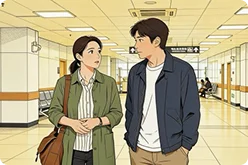
Brief -> Video
PROMPT
Send us your script or storyboard using our script to video generator, or share a plain-language brief with our text to video generator. We handle prompt engineering, parameter tuning, and quality review, delivering a production-ready clip to your spec.
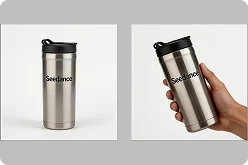
Image -> Animated clip
PROMPT
Upload a still image, product shot, photograph, or artwork using our image to video generator. We animate it with motion-aware generation, preserving visual fidelity while bringing it to life with directed movement.
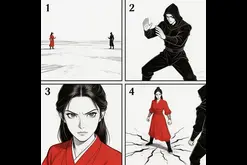
Storyboard -> Replicated Clips
PROMPT
Share a reference clip—any video with camera movement, choreography, or a visual style you want. We extract its motion logic and apply it to your characters and environments.
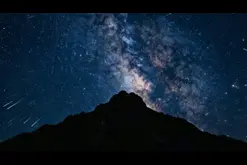
Add Subtitles
PROMPT
Share a video with voiceover or dialogue or any clip with spoken audio you want captioned. We extract the speech rhythm and sync subtitles to your video automatically.
Top Seedance 2.0 Use Cases
Explore how teams use one of the top ai video generation tools 2026 for real production workflows, from multi-input generation to final delivery.
Ready to hand off your next video brief?
Tell us your format, style, and deadline—we’ll handle the rest.
Seedance 2.0 AI Video Generation Examples
Camera follows a man in black sprinting through a crowded street, a group chasing close behind. The shot cuts to a side tracking angle as he panics and crashes into a roadside fruit stall, scrambles to his feet, and keeps running. Sounds of a frantic crowd
Copy PromptA spear-wielding warrior clashes with a dual-blade fighter in a maple leaf forest. Autumn leaves scatter on each impact. Wide shot pulls into tight close-ups of parrying blades, then cuts to a slow-motion overhead as both leap into the air
Copy PromptSpy thriller style. Front-tracking shot of a female agent in a red trench coat walking forward through a busy street, pedestrians constantly crossing in front of her. She rounds a corner and disappears. A masked girl lurks at the corner, glaring after her. Camera pans forward as the agent walks into a mansion and vanishes. Single continuous take, no cuts
Copy Prompt15s commercial. Shot 1: side angle, a donkey rides a motorcycle bursting through a barn fence, chickens scatter. Shot 2: close-up of spinning tires on sand, then aerial shot of the donkey doing donuts, dust clouds rising. Shot 3: snow mountain backdrop, the donkey launches off a hillside, text ‘Inspire Creativity, Enrich Life’ revealed behind it as dust settles
Copy PromptWhy Creators Choose MarsHub’s AI Video Generation Platform
“The one-take continuous shot capability is impressive. Complex camera movements and scene transitions that would be impossible to shoot are now just a prompt away. ”

Olivia Martinez
Video Editor
“The built-in audio generation is fantastic. Sound effects match the action perfectly, and the music beat sync feature is incredibly useful for dance and music content.”
Alex Turner
Music Video Director
“The built-in audio generation is fantastic. Sound effects match the action perfectly, and the music beat sync feature is incredibly useful for dance and music content. ”

Thomas Anderson
Cinematographer
“The natural language control is so intuitive. I just describe what I want to reference and how, and the model understands perfectly. No more struggling with complex prompts.”
Jessica Liu
Animation Director
“Video editing in Seedance 2.0 is revolutionary. I can modify specific segments, replace characters, or extend scenes without regenerating the entire video. Huge time saver!”
Mohammed Hassan
Digital Artist
“The reference capability is mind-blowing. I uploaded a film clip and the model perfectly replicated the camera movement and pacing. This is what AI video should be.”
Sarah Chen
Content Creator
“Finally, character consistency that actually works! Faces, clothing, even small text - everything stays consistent throughout the video. Seedance 2.0 solved our biggest problem.”
Marcus Rodriguez
Filmmaker
“The video extension feature is seamless. I can extend clips naturally and even merge different scenes together. It's like having an AI editor that understands continuity. ”
Emily Watson
Creative Director
“Being able to reference trending video templates and recreate them with my own style has 10x'd my content output. The multi-modal approach just makes sense. ”
David Kim
Video Producer
“Seedance 2.0's multi-modal input is a game-changer. I can finally reference a dance video and apply it to any character I want. The motion replication is incredibly accurate! ”
Priya Sharma
Social Media Manager
FAQs


 contact@marshub.com




Copyright © 2002 - 2026. All rights reserved